


This repository contains Android optimization tips, performance tweaks, debloating recommendations, and lightweight app alternatives.
- Enable Developer options
- Performance tweaks
- Debloat list
- Recommended apps to use
- Credits
- On Linux debloat tutorial
Before starting let's enable Android Developer options.
⚙ Before we begin you'll need to enable Developer options.
-
Open Settings.
-
Tap About phone.
-
Tap Software information.
-
Tap Build number seven times.
-
If prompted, enter your screen lock.
-
A message will appear confirming that Developer options have been enabled.
-
Return to the main Settings menu.
-
Tap Developer options.
Let's start by changing Logger buffer sizes.
⚠ WARNING: Changing developer options may affect your device's behavior. Proceed only if you're comfortable making these changes.
Watch the video below for a tutorial.
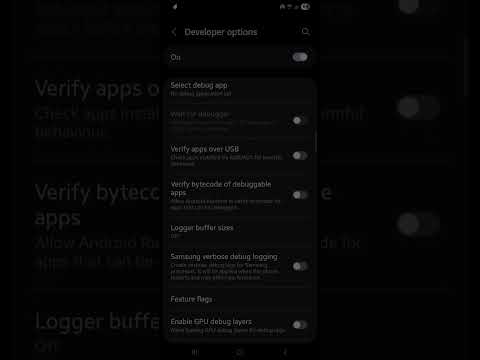
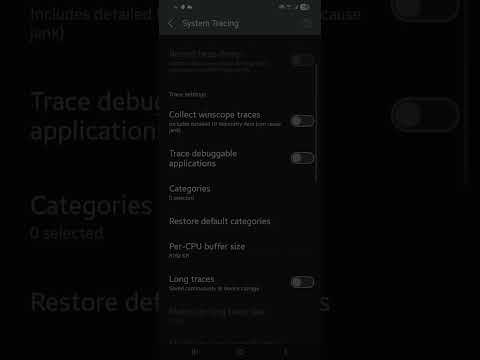
Once you've finished, log recording will be disabled. On some devices, this may reduce background logging, although any performance impact can vary.
Watch the video below for a tutorial.
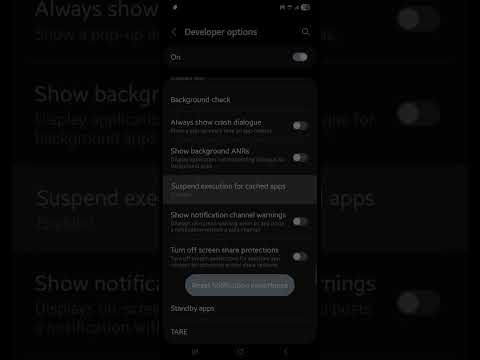
Let's enable Suspend Execution for Cached Apps After enabling this option, device may need to restart. to apply the change.
This setting allows Android to pause cached apps when they are not being used. The effect on performance can vary depending on your device and usage.
Watch the video below for a tutorial.
Now that were finished here, we'll continue with Shizuku. Shizuku allows you to debloat system apps without rooting your device. You can download it from Shizuku  . It requires ADB setup on your computer but it's worth it for advanced debloating Find Tutorial On YouTube For Detailed Steps.
| Category | Apps |
|---|---|
| Samsung Bloat | Bixby, Voice Wake Up, Customisation Service, Galaxy Avatar, Samsung Kids, Samsung News, Smart Switch |
| Google/Meta | Chrome, Gmail, Maps, Meet, Meta App Installer, Meta App Manager, Meta Services |
| Microsoft | Microsoft Swiftkey Factory Settings, Microsoft Swiftkey, OneDrive |
| System/Other | Link To Windows, Speech Synthesis, WiFi Tips |
To debloat apps i suggest you Canta  .
.
If you have computer you can try ADB step by step Linux OS
1.Firstly lets download android platform tools from your terminal copy this text paste it on terminal
sudo apt install adb2.Connect your device to laptop or PC and type this exactly in your terminal
adb devices3.If it doesnt show up make sure you enabled USB Debugging on developer options
If it shows up your phone ID type this command
adb shell pm disable-user --user 0 *package.name.here*4.If you dont know what is the package name type
adb shell pm list | grep "*example: bixby,samsung,google,meta,facebook,windows*"After reviewing the list, you can remove any apps you don't use.
⚠ Only remove apps you don't use. Some apps may be required for certain features.
After debloating unused apps, consider replacing them with lightweight open-source alternatives.
-
- Sterna Mail
 - A lightweight email app designed with a no bloat. It uses Material Design You (MDY) and focuses on low usage. while it can be a bit hard to setting it up
- Sterna Mail
-
- Easy Notes
 - A Simple lightweight notes app no bloat and easy to use, with Material Design You.
- Easy Notes
-
- Translator
 - An offline translator app that works without an internet connection. Useful for translating text when network access is unavailable
- Translator
-
- Cromite
 - A privacy-focused browser based on chromium. It includes built-in ad blocking, privacy improvements, and a clean browsing experience while keeping compatibility with modern websites.
- Cromite
-
- Booming Music
 - A Music player that has really useful features while keeping size ideal.
- Booming Music
-
- PassVault
 - Ever bored about normal autofill's like Google Autofill Service and Samsung Pass? well this app brings better Password management on Browser's and supports JSON, CSV, KDBX.
- PassVault


