
Subclass of UIAlertController
- Xcode 10.0
- Swift 4.2
- iOS 12
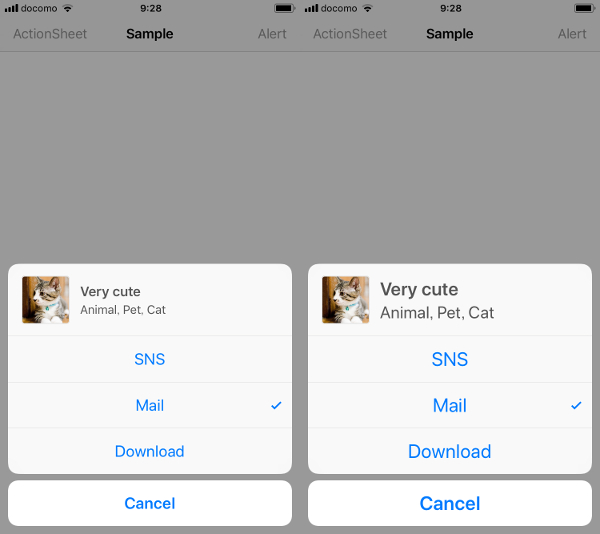
@IBAction func actionSheetButtonTouched(_ sender: UIBarButtonItem) {
    let alert = CustomAlertController(title: "Very cute", message: "Animal, Pet, Cat", preferredStyle: .actionSheet)

    let storyboard = UIStoryboard(name: String(describing: CustomAlertSubtitleViewController.self), bundle: nil)
    let vc = storyboard.instantiateInitialViewController() as! CustomAlertSubtitleViewController
    vc.image = UIImage(named: "Cat")
    vc.text = alert.title
    vc.detailText = alert.message

    alert.contentViewController = vc
    alert.checkedIndex = 1

    alert.popoverPresentationController?.barButtonItem = sender

    alert.addAction(UIAlertAction(title: "SNS", style: .default) { action in
    })
    alert.addAction(UIAlertAction(title: "Mail", style: .default) { action in
    })
    alert.addAction(UIAlertAction(title: "Download", style: .default) { action in
    })
    alert.addAction(UIAlertAction(title: "Cancel", style: .cancel) { action in
    })
    present(alert, animated: true)
}
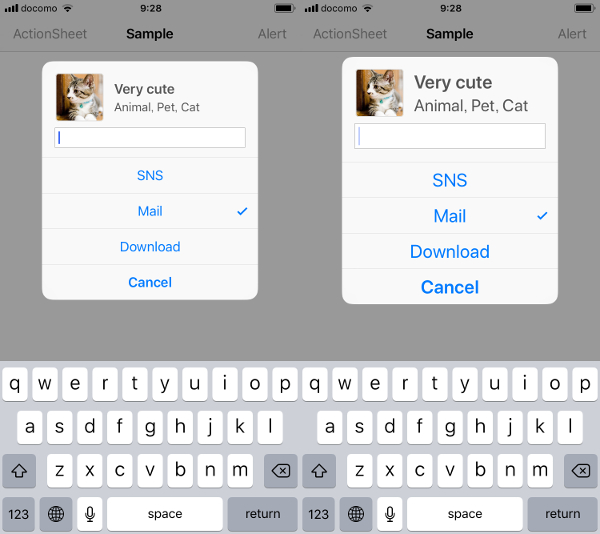
@IBAction func alertButtonTouched(_ sender: UIBarButtonItem) {
    let alert = CustomAlertController(title: "Very cute", message: "Animal, Pet, Cat", preferredStyle: .alert)

    let storyboard = UIStoryboard(name: String(describing: CustomAlertSubtitleViewController.self), bundle: nil)
    let vc = storyboard.instantiateInitialViewController() as! CustomAlertSubtitleViewController
    vc.image = UIImage(named: "Cat")
    vc.text = alert.title
    vc.detailText = alert.message

    alert.contentViewController = vc
    alert.checkedIndex = 1

    alert.addTextField { textField in
    }
    alert.addAction(UIAlertAction(title: "SNS", style: .default) { action in
    })
    alert.addAction(UIAlertAction(title: "Mail", style: .default) { action in
    })
    alert.addAction(UIAlertAction(title: "Download", style: .default) { action in
    })
    alert.addAction(UIAlertAction(title: "Cancel", style: .cancel) { action in
    })
    present(alert, animated: true)
}