
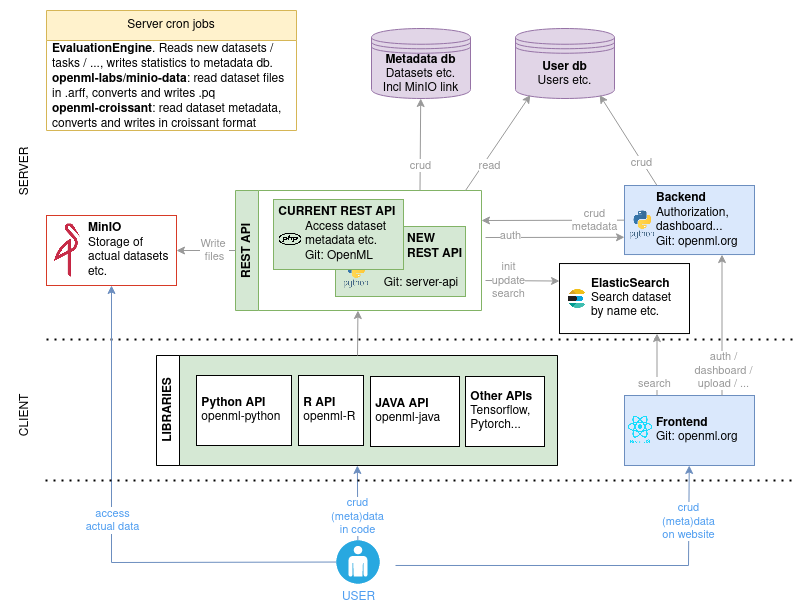
Overview of all OpenML components including a docker-compose to run OpenML services locally. The Python-based REST API (or REST API version 2) is still experimental, the other services are used in production.
Note: For the development of the Python-based REST API, a separate definition of services is currently maintained. These are in that repository, see the Python REST API documentation for more information.
- Linux/MacOS (For Mac with
armarchitectures, enable Rosetta for emulation. QEMU and Docker VMM do not work with the elastic search image) - Docker
- Docker Compose version 2.21.0 or higher
Clone the repo from GitHub:
git clone https://github.com/openml/services.gitWhen using this project for the first time, run:
chown -R www-data:www-data data/php
# Or, if previous fails, for instance because `www-data` does not exist:
chmod -R 777 data/php
This is necessary to make sure that you can upload datasets, tasks and runs. Note that the dataset data is meant to be public anyway, so a 777 should not be problematic. This step won't be necessary anymore once the backend stores its files on MinIO.
You run all OpenML services locally using
docker compose --profile all up -dStop it again using
docker compose --profile all downYou can use different profiles:
[no profile]: databases"elasticsearch": databases + nginx + elasticsearch"rest-api": databases + nginx + elasticsearch + REST API"frontend": databases + nginx + elasticsearch + REST API + frontend + email-server"minio": databases + nginx + elasticsearch + REST APP + MinIO + parquet and croissant conversion"evaluation-engine": databases + nginx + elastichsearc + REST API + MinIO + evaluation engine"all": everything
Usage examples:
docker compose --profile all up -d       # all services
docker compose up -d                     # only the database
docker compose --profile frontend up -d  # Frontend, rest-api, elasticsearch and database
Use the same profile for your down command.
The Python REST API is also available in a 'light' mode that allows for database interactions but does not allow for file uploads/downloads. It has to be started directly (as opposed to through a profile):
docker compose up python-api-light -d
docker compose down
While it is up, the API is available under http://localhost:8082, e.g., http://localhost:8082/datasets/1.
See the Github Issue list for the known issues.
Some usefull commands:
docker logs openml-php-rest-api -f              # tail the logs of the php rest api
docker exec -it openml-php-rest-api /bin/bash   # go into the php rest api container
./scripts/connect_db.sql # access the databaseTip
If you change any port, make sure to change it for all services!
When you spin up the docker-compose, you'll get these endpoints:
- Frontend: localhost:8000
- Database: localhost:3306, filled with test data.
- ElasticSearch: localhost:9200 or localhost:8000/es, filled with test data.
- Rest API: localhost:8080
- Minio: console at localhost:9001, filled with test data.
You can connect to specific images by using the following command:
docker exec -it <name of container> <command>
This means that the following command would create an iterative (-it) session on container openml-test-database using the command mysql -uroot -p -d openml_expdb:
docker exec -it openml-test-database mysql -uroot -p -d openml_expdb
The credentials for the database can be found in config/database/.env, for minio in config/minio/.env, etc.
The email-server is used for emails from the frontend. For example, if you create a new user, an
email is send to the user. All outgoing emails are rerouted to catchall@example.com. You can see
the messages in config/email-server/messages. Note that some of the urls in the emails need to
be slightly altered to use them in the test setup: change https to http.
When working on the services repository itself, the scripts directory provides a small number of integration tests to catch the most glaring issues. They are currently limited to REST API and evaluation engine functionality and also run automatically in CI.
For example, after starting services, to test dataset upload run:
./scripts/upload_dataset.shIf successful, this will also print the dataset id assigned to the new dataset. To test if dataset processing works, we can then run:
./scripts/wait_for_dataset.sh DATASET_IDwhere DATASET_ID is replaced by the identifier printed in the previous step.
If you want to do local development on containers that are part of the docker-compose, you want those containers to change based on your code. You should have the relevant code somewhere on your system. You will need to tell the docker-compose where to find it. You can do so by setting environment variables.
Create a new .env file inside this root directory, and set the following values depending on what development you are doing:
PHP_CODE_DIR=/path/to/OpenML                  # Root of https://github.com/openml/OpenML on your computer
PHP_CODE_VAR_WWW_OPENML=/var/www/openml       # Always set this to /var/www/openml. Leave empty if you leave PHP_CODE_DIR empty
Important:
Make sure to create openml_OS/config/BASE_CONFIG.php in your local $PHP_CODE_DIR.
You can copy openml_OS/config/BASE_CONFIG-BLANK.php into openml_OS/config/BASE_CONFIG.php directly and leave all values as is. All needed values are filled in at startup time for the container.
Run docker compose with profile rest-api (or all) to start the PHP container.
ARFF_TO_PQ_CODE_DIR=/path/to/minio-data       # Root of https://github.com/openml-labs/minio-data on your computer
ARFF_TO_PQ_APP=/app # Always set this to /app. Leave empty if you leave ARFF_TO_PQ_CODE_DIR emptyCROISSANT_CODE_DIR=/path/to/openml-croissant/python # Python directory of https://github.com/openml/openml-croissant on your computer
CROISSANT_APP=/app # Always set this to /app. Leave empty if you leave CROISSANT_CODE_DIR emptyFRONTEND_CODE_DIR=/path/to/openml.org # Python directory of https://github.com/openml/openml.org on your computer
FRONTEND_APP=/app # Always set this to /app. Leave empty if you leave FRONTEND_CODE_DIR emptyMake sure the code in your frontend directory is build, by running (from your local FRONTEND_CODE_DIR dir)
./server/src/client/app/node_modules/.bin/env-cmd -f ./.env.dev npm install --prefix server/src/client/app
./server/src/client/app/node_modules/.bin/env-cmd -f ./.env.dev npm run build --prefix server/src/client/appThe work-in-progress Python-based REST API is available at http://localhost:8000/py through nginx or http://localhost:8082 directly.
Mounting code through environment variables is not yet supported for this service.
You can run the openml-python code on your own local server now! Normally, you would be able to run the following command to start a Python console:
docker run --rm -it -v ./config/python/config:/root/.config/openml/config:ro --network openml-services --add-host localhost:172.28.0.2 openml/openml-pythonBut the current image is a bit out of date so instead start the container with:
docker run --rm -it -v ./config/python/config:/root/.config/openml/config:ro --network openml-services --add-host localhost:172.28.0.2 --entrypoint=/bin/bash openml/openml-python -c "/openml/venv/bin/python -m pip install -U pyarrow pandas && cd /openml && /openml/venv/bin/python"For an example of manual tests, you can run:
import openml
from openml.tasks import TaskType
from openml.datasets.functions import create_dataset
import pandas as pd
import numpy as np


df = pd.DataFrame(np.random.randint(0,100,size=(100, 4)), columns=list('ABCD'))
df["class"] = ["test" if np.random.randint(0, 1) == 0 else "test2" for _ in range(100)]
df["class"] = df["class"].astype("category")

dataset = create_dataset(
    name="test_dataset",
    description="test",
    creator="I",
    contributor=None,
    collection_date="now",
    language="en",
    attributes="auto",
    ignore_attribute=None,
    citation="citation",
    licence="BSD (from scikit-learn)",
    default_target_attribute="class",
    data=df,
    version_label="test",
    original_data_url="https://www4.stat.ncsu.edu/~boos/var.select/diabetes.html",
    paper_url="url",
)
dataset.publish()

# Meanwhile you can admire your newly created dataset at http://localhost:8000/search?type=data&id=[dataset.id]
# Wait a minute until dataset is active

my_task = openml.tasks.create_task(
    task_type=TaskType.SUPERVISED_CLASSIFICATION,
    dataset_id=dataset.id,
    target_name="class",
    evaluation_measure="predictive_accuracy",
    estimation_procedure_id=1,
)
my_task.publish()

# wait a minute, so that the dataset and tasks are both processed by the evaluation engine.
# the evaluation engine runs every minute.
# Meanwhile you can check out the newly created task at localhost:8000/search?type=task&id=[my_task.id]

my_task = openml.tasks.get_task(my_task.task_id)
from sklearn import compose, ensemble, impute, neighbors, preprocessing, pipeline, tree
clf = tree.DecisionTreeClassifier()
run = openml.runs.run_model_on_task(clf, my_task)
run.publish()

# wait a minute, so the the run is processed by the evaluation engine

run = openml.runs.get_run(run.id, ignore_cache=True)
run.evaluations

# Expected: {'average_cost': 0.0, 'f_measure': 1.0, 'kappa': 1.0, 'mean_absolute_error': 0.0, 'mean_prior_absolute_error': 0.0, 'number_of_instances': 100.0, 'precision': 1.0, 'predictive_accuracy': 1.0, 'prior_entropy': 0.0, 'recall': 1.0, 'root_mean_prior_squared_error': 0.0, 'root_mean_squared_error': 0.0, 'total_cost': 0.0}If you want to develop a service that depends on any of the services in this docker-compose, just bring up this docker-compose and point your service to the correct endpoints.